I Had Claude Code Make the Demo GIF for My README
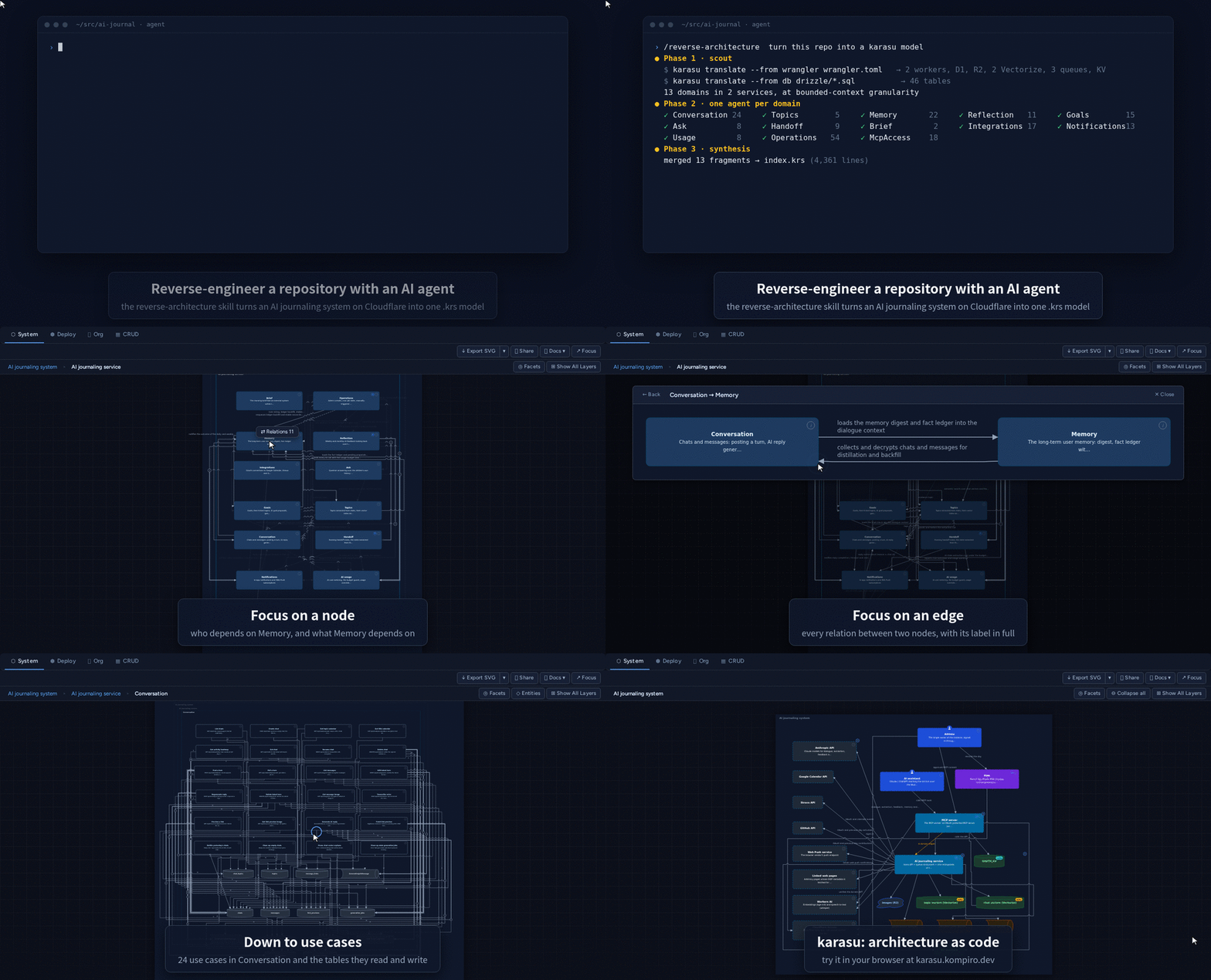
I put this demo GIF at the top of the README for karasu, the architecture diagram tool I develop. Claude Code made it, from the script through recording and captions to the final GIF.
My impression is that few engineers know Claude Code can make demo videos. This post shows briefly how it was recorded, then covers what I decided along the way.
Summary
- Claude Code can drive an app inside a devcontainer (a Linux container), record it, and turn the recording into a captioned, looping GIF. It never had to touch my own browser.
- What to tell it first is the purpose, not the format. When I said “a looping GIF for the README” instead of “a 3-minute intro video,” it came back with a 20 to 30 second script.
- Most of my decisions came after I saw a prototype. I had said captions were unnecessary, and the prototype changed my mind. I only thought about what was safe to make public when I read the captions.
How it was recorded
I do my development in a devcontainer.
Visual Studio Code opens a Linux container, and I run Claude Code inside it.
Claude Code started karasu’s preview server (karasu serve) in the container and recorded while driving a browser with Playwright.
It recorded through the Chrome DevTools Protocol screencast, which sends a frame only when the screen changes.
A still scene costs one frame, so the GIF stays small.
The mouse cursor and the captions are overlays drawn on the page for the recording.
ImageMagick assembles the frames into a GIF.
The only thing added to the container was a Japanese font. I also made a Japanese version, and without the font its captions and the app’s Japanese UI render as boxes.
The opening terminal scene is a rebuilt replay, not a recording. The real run took about 15 minutes, far too long for a GIF. Every command and number on that screen comes from the real run.
The recording scripts live in the karasu repository, so I can re-record the same way when the UI changes. The steps are in scripts/readme-demo/README.md.
From a 3-minute intro video to a 30-second loop
My first request was “I want to shoot a 3-minute demo video introducing karasu. Start by drafting a script.” I got a 3-minute script with narration. It was exactly what I had asked for.
So I explained why I wanted it. The README had no looping image at all, and I wanted one. I didn’t need an opening; showing what the tool can do mattered more. Should a GIF be a minute long, or even shorter?
The answer was “20 to 30 seconds, a minute at most,” with three reasons. A GIF has no seek bar and no sound, so viewers can’t skip to the part they want. A 3-minute GIF runs to tens of megabytes and slows down the README. Command-line steps read better as code blocks in the README than as text inside a GIF.
Explaining the purpose changed the content as well as the length. The command-line scenes from the first script disappeared, and only the operations you can follow by watching remained. I had said “a 3-minute video” because I was thinking in terms of the format. Had I given only the format, I would have ended up with a well-made 3-minute video.
The decisions that changed after the prototype
While we were working out the script, Claude Code asked whether to add captions. I answered that it would be better if the GIF made sense without them. I also said I wanted to show off a huge system at a glance, not a small diagram with a few nodes.
On the subject, I changed my mind after seeing what a trial produced. Claude Code first suggested a WordPress model it found locally (about 20,000 lines, 42 domains). I wanted to see whether my own AI journaling service would be enough, so I asked it to reverse-engineer that. Claude Code spun up 13 subagents, one per domain, and built the model with about 1.5 million tokens. Its report said: “Not huge enough, but the diagram stays readable at every level you descend to. WordPress turns into a tangle of lines once you drill in.” After seeing the actual screens, I dropped the idea of showing scale and went with the AI journaling service.
Captions went the same way. The first prototype was 18 seconds with no captions, and when I watched it, I couldn’t tell what it was trying to show. The screen moved, and it drilled down. But I felt that someone who didn’t know karasu wouldn’t understand why any of those operations were happening. I asked to see a captioned version too, and 14 minutes later I had two GIFs, with and without captions. Side by side, the captioned one got the idea across far better.
My belief that it would work without captions was a judgment I made in my head before anything existed. I only found out it was wrong when I saw the real thing. When a prototype arrives in a quarter of an hour, there is little reason to settle a judgment up front. My part was to look at what came back and say “this doesn’t get the point across.”
What it could touch, and what viewers could see
Apart from the content of the demo, I drew two boundaries.
The first was what Claude Code could touch. Claude Code also has computer use, which looks at the screen and drives the mouse and keyboard, so it could have recorded in my own browser. But my browser holds plenty of logged-in sessions, and I’d rather not let an agent near them. This time everything stayed inside the devcontainer with Playwright, so the question never came up. When the recording was done, I also had it list what it had added to the container and how to undo each item.
The second was what viewers could see. The AI journaling service I used as the subject lives in a private repository. It only came to mind when I watched the captioned prototype and noticed the repository name in the opening caption. I had the caption changed to “an AI journaling system on Cloudflare,” then asked for the names in the diagram to be hidden too. Claude Code replaced them everywhere, in the breadcrumbs, the data store names, the worker names, and the title of the opening terminal, and checked that the original name no longer appeared anywhere in the model. It then pointed out that the comment at the top of the model still contained the repository name and needed to go before any commit. In the end, the demo model stayed out of the repository, and the README for the recording scripts says why.
Here too, what prompted me to draw a line was seeing the prototype. I decided where the lines went, and Claude Code applied them down to the details.
Takeaways
Claude Code will drive an app inside a container, record it, and turn it into a captioned, looping GIF. If you have wanted a demo video but never thought it worth the effort, try asking for one.
When you ask, start with where the video will live and who it is for, before length or format. After that, watch the prototypes and complain about whatever doesn’t land. What to show and what to keep hidden is still yours to decide as you watch.