Mapping an Unfamiliar Repository: Introducing karasu's reverse-architecture Skill
Getting the big picture of a repository you have never worked on always takes effort. What services are there, which data stores do they write to, and how do the features depend on each other? You guess from the README and the directory layout, then go back and forth between the routes and the schema until a diagram takes shape in your head.
I have published a skill, reverse-architecture, that hands this work to an agent, as a Claude Code plugin. The skill reads the repository and writes an architecture model, and karasu, the architecture diagram tool I develop, draws it.
Summary
- reverse-architecture is a skill that turns a repository into a karasu
.krsmodel. Ask for it, and it puts everything from services down to tables into one diagram. - On umami, an OSS web analytics tool, it produced a model with 10 domains and 135 usecases. The investigating subagents used about 960k tokens in total, and the run took about 10 minutes through to synthesis.
- The output is a map to review and evolve, not the correct diagram. Boundaries it was unsure about stay marked, and the diagrams can still be easier to read. If something bothers you when you use it, please tell me in a karasu issue.
What reverse-architecture and karasu each do
karasu describes a system’s logical, physical, and organizational structure in a text language (.krs) and renders it as diagrams.
Instead of packing everything onto one page, it lets you descend step by step from the system to services, domains, and usecases.
The introduction to karasu covers the syntax and the design ideas.
reverse-architecture builds that .krs from an existing repository.
The roles are split: the skill (that is, the agent running it) reads the repository and writes the model, and the karasu CLI validates and renders it.
When the repository has a docker-compose file or a DB schema, the CLI converts it mechanically.
That way the agent does not have to guess the infrastructure.
How to use it
Install it in Claude Code as follows. The skill drives the karasu CLI, so install the CLI too.
npm i -g karasu
/plugin marketplace add kompiro/karasu
/plugin install karasu@karasu
Then open Claude Code in the repository you want to look into and ask “turn this repo into a karasu model” or “reverse architecture”.
The agent first scouts the whole repository and proposes how to split it into domains.
It starts one investigating subagent per domain, so for a large repository it shows the domain count and a rough cost estimate and asks before going ahead.
Once you agree, the investigation and synthesis run, and you end up with an index.krs.
Claude Code is the only supported agent for now.
The plugin does not update automatically, so pick up new releases from the /plugin menu.
What umami looks like as a map
As an example, I mapped umami, an OSS web analytics tool (version 3.4.0, about 1,300 source files). This is the top-level diagram.
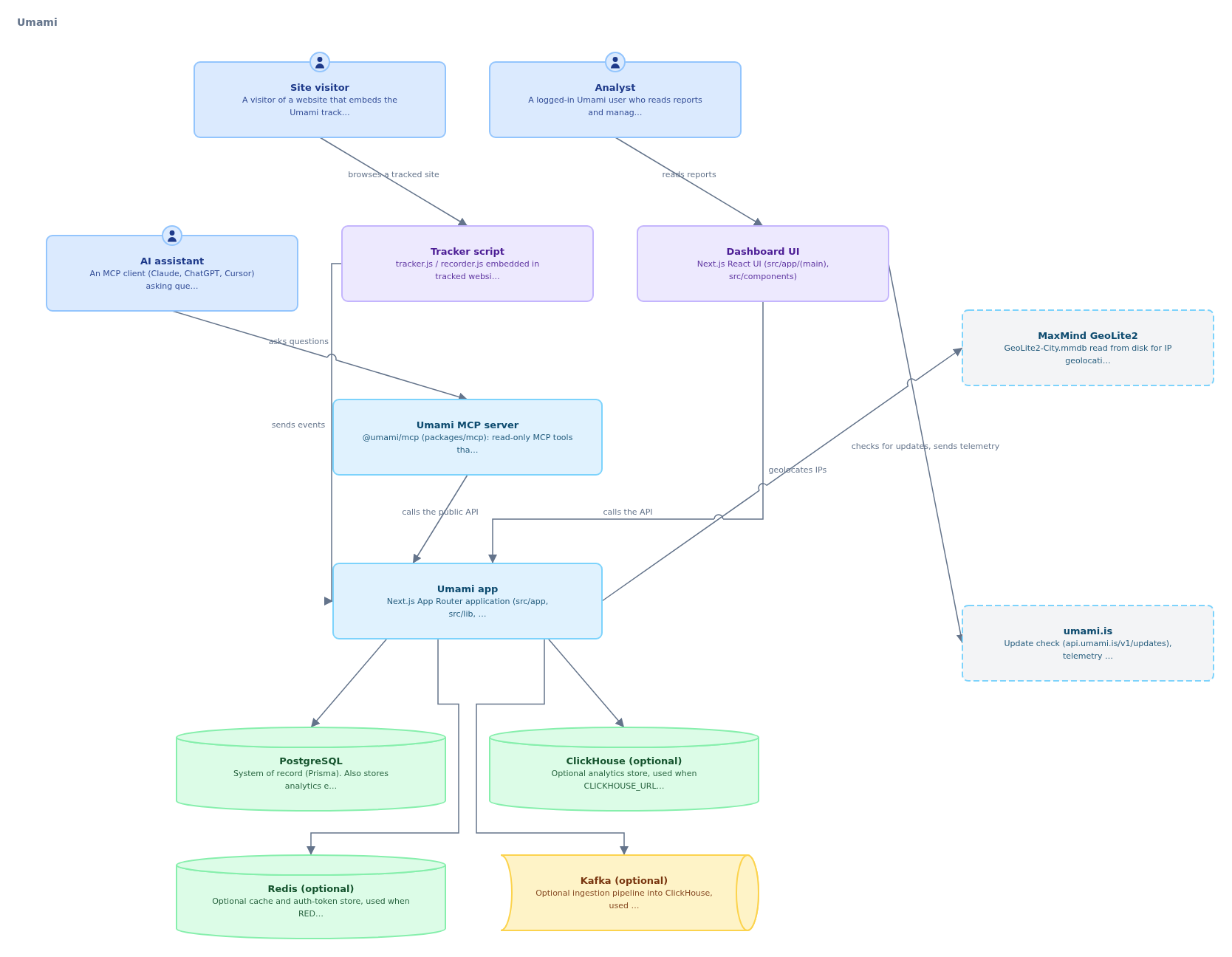
A single Next.js app serves the tracking endpoints, the API, and the dashboard. You can also read that PostgreSQL is required, while ClickHouse, Redis, and Kafka are used only when configured. Beneath this one diagram sits the following model:
- Domains: 10 of them (tracking, analytics, session replay, websites with links and pixels, boards, sharing, teams, identity, administration, and MCP tools)
- Usecases: 135. Each one records the PostgreSQL or ClickHouse tables, Redis keys, and Kafka topics it touches, with reads and writes told apart
- Entities: 26. Every one of PostgreSQL’s 26 tables is mapped to an entity
Once you descend into a domain, the diagrams get detailed, so the gallery is a better way to look at them than screenshots. I put the generated model in the karasu gallery. From the Umami app you can follow the diagrams down to the dependencies between domains, and from a domain down to its usecases and tables. You can also drill into a database such as PostgreSQL and see the relations between its tables as a simple ER diagram. The usecase descriptions record the behavior the agent read from the code (such as which table it writes to under which condition).
Here is what it cost. Ten subagents did the investigation, each using roughly 70k to 150k tokens, about 960k in total. I ran them in two batches of five, and it took about 10 minutes from the start of the investigation to the end of synthesis. The scouting and synthesis ran in the main session, so they are not included in these numbers.
Things to keep in mind
Treat the output as a map to review and evolve.
Where the agent could not settle a domain boundary, it marks the spot with @draft.
In the umami run, two spots were marked: whether session replay should be separate from tracking, and whether links and pixels belong in the same domain as websites.
Both were settled during the investigation, on evidence from the code.
The reasoning stays in the model’s descriptions, so a human reader can correct it if it looks wrong.
Cost grows with the number of domains and the size of the repository. A small repository may need only a few hundred thousand tokens, but for a large one it is safer to budget more than 100k tokens per domain. When the agent asks you to confirm the domain count, decide with that number in mind.
If the repository lacks the inputs that describe its infrastructure, you may need to prepare them first. umami generates its OpenAPI spec at build time and does not commit it, so I installed its dependencies and generated the spec before the run. I also converted the Prisma schema into SQL. A model can still be built without these inputs. In that case, though, finding the usecases and tables depends entirely on the agent reading the source.
The diagrams could also be easier to read.
In the umami run, the agent wrote the evidence for each dependency into the labels of the arrows between domains, so the diagram of domain dependencies filled up with text.
I filed this as an issue and plan to change the skill so that labels stay short and the evidence moves into the description.
Also, the local preview server (karasu serve) does not work yet when karasu is installed from npm (issue).
Until that is fixed, export an SVG with karasu render index.krs -o arch.svg and open that.
Takeaways
reverse-architecture is a skill for turning the big picture of an unfamiliar repository into a karasu diagram you can keep. For umami, about 10 minutes of investigation put everything from services down to tables into one model. It is less a finished diagram than a map to start a review from.
If you notice a diagram that is hard to read, or a structure the model could not express well, please tell me in a karasu issue. Both issues above came from actually mapping umami.
I am also preparing a skill for writing up your own system as .krs through conversation and keeping it up to date.
I will introduce it once it is published.